
Website statistics that stay in your own Odoo — with no external service.
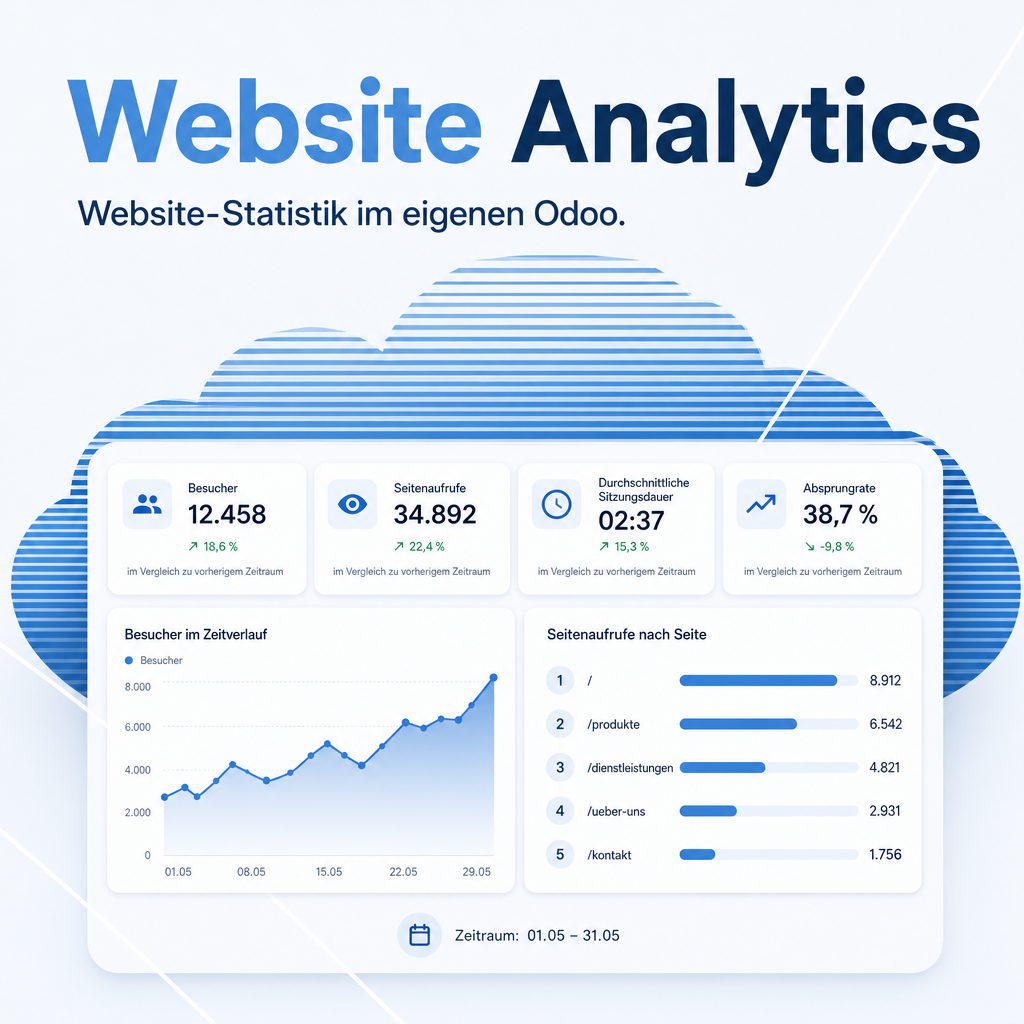
See how your website is actually used — with numbers that never leave your own Odoo. No Google Analytics, no external service, no data processing agreement.
The measurement sets no cookie of its own and uses no browser storage; no IP address is ever written to the database. It fits into the cookies bar your Odoo site needs anyway: by default it measures only after the visitor accepted optional cookies. And the figures sit in the same database as your quotations and customers.
The help for this module is findable — for people and for AI
Five help pages in German and English, shipped inside the module. With Help Docs installed you search them in full text — and an AI assistant reads the same content through a machine-readable module card.
"eq_website_analytics")
Full-text search and module card come from Help Docs (eq_helper). This module ships the content — no extra configuration.
Features
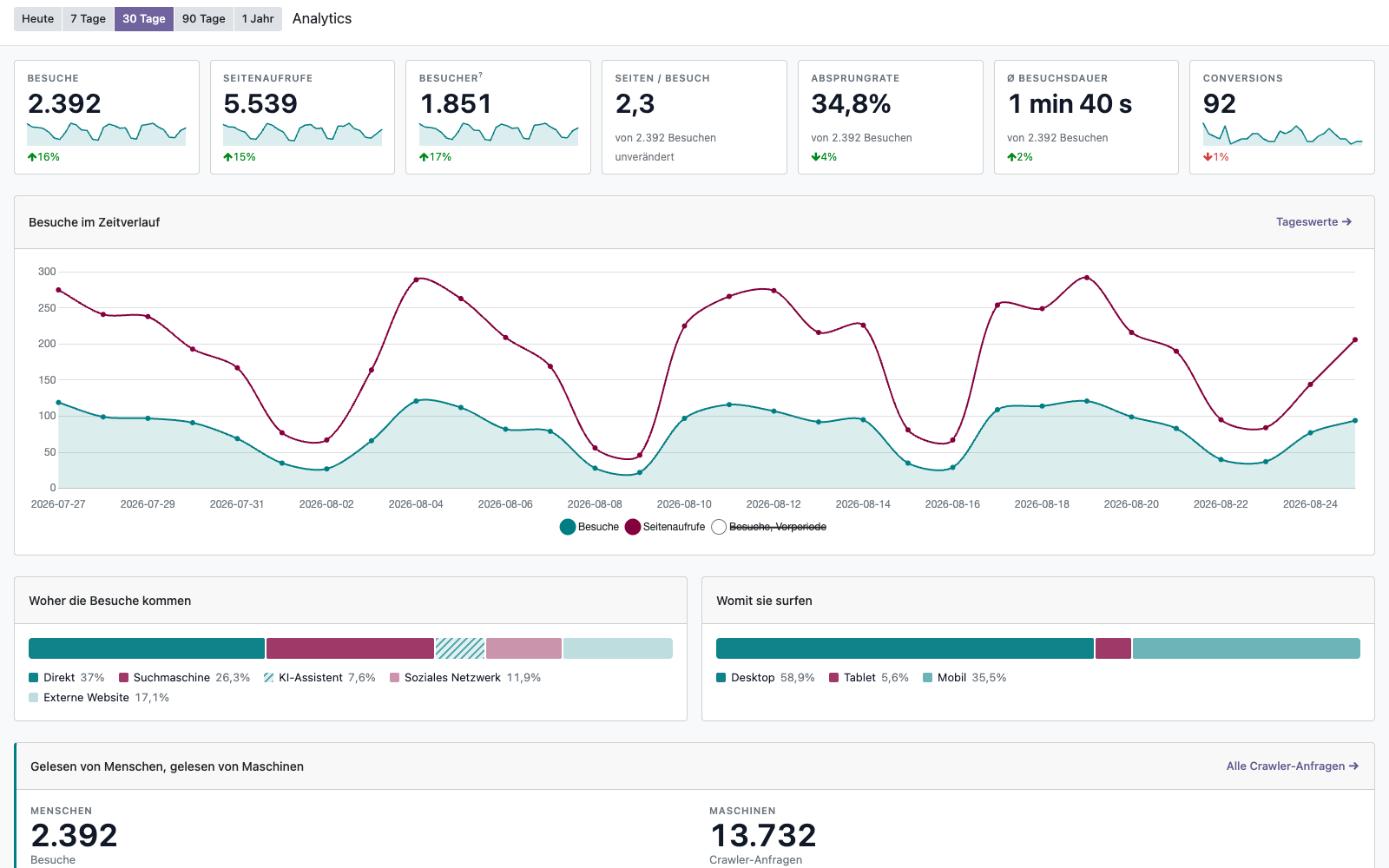
Every key figure at a glance
Visits, page views, visitor count, bounce rate, average time on site and goal completions — each with a comparison against the previous period.
- Time series for today, 7, 30, 90 days or a year
- One click from any figure into the familiar Odoo views with filters and Excel export
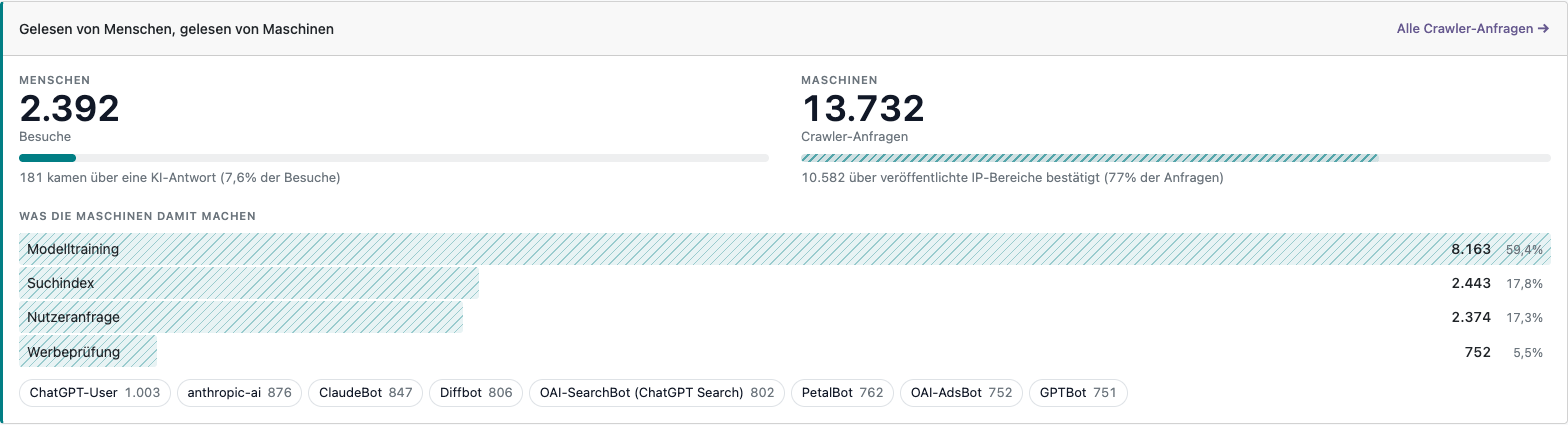
Who reads your site — and is it a person?
AI crawlers run no JavaScript, so ordinary web statistics cannot see them at all. This module counts them on the server, separated by what they do with the content: build a search index, answer a question someone just asked, or collect material for model training. Only the first two can send anyone back to you.
- Every request checked against the operators’ published IP ranges — a user agent claiming to be GPTBot is not taken at face value
- Visitors arriving from an AI answer appear as their own referrer category, so you can tell whether the effort pays off
When do people actually come?
A weekday-by-hour overview shows the busiest times at a glance — useful for timing a newsletter or planning a maintenance window.
- Rankings of top pages, landing pages, referrers, countries and devices
- Campaign tracking for newsletters, ads and social posts

You define what counts as success
The thank-you page after a contact form, a price-list download, a click on a booking link. Goals trigger either on a page view or on an action — and you then see which campaign and which landing page produce them. Downloads, outbound clicks and submitted forms are recorded too.
Four languages, one set of numbers
The interface is fully translated into English, German, French and Spanish — 202 terms each, including every data-protection explanation on the settings page. Everyone works in their own login language.
- Goal names are translatable, and a goal still counts as one figure no matter which language a visitor was browsing in
- Weekday and number formats follow the user’s Odoo language, not the browser
Data protection built in
A visitor identifier expires after 48 hours, individual records after 30 days; only the aggregated figures are kept permanently. Per website you can exclude your own team’s visits, honour the browser’s Do-Not-Track signal and set retention periods. Ready-made privacy-policy wording and a prepared entry for the record of processing activities ship with the module.
Frequently Asked Questions
Do I need a cookie banner for this?
Your Odoo site needs
a cookies bar in any case: Odoo itself sets cookies such as session_id and
frontend_lang. This module sets none of its own and stores nothing in the browser,
but it derives its visitor hash server side from the IP address and the user agent — which
the EDPB guidelines on Article 5(3) ePrivacy treat as potentially in scope. It therefore ships
with Measure Only After Consent switched on and simply rides along on the consent your
cookies bar already collects. If your own legal assessment says consent is dispensable, switch
it off. Privacy-policy wording for both cases is included.
Where is the data stored?
In your own Odoo database, next to your quotations and customers. There is no processor, no transfer to a third country and no running cost for an analytics service.
How long is data kept?
A visitor identifier expires after 48 hours and individual records after 30 days, both configurable. The aggregated figures stay permanently.
Who can see the statistics?
Only authorised staff. On a multi-website database each user sees the figures of their own websites.
Why does the country say “Unknown”?
The country is the one
figure Odoo resolves itself from the IP address — this module only reads the result. That
needs three things on your server: a geolocation database in the MaxMind DB format
(.mmdb), its path in odoo.conf (geoip_country_db), and
proxy_mode = True behind a reverse proxy. Beware of the Linux package
geoip-database: it ships the discontinued legacy .dat format that Odoo
has not read since version 13, so a server can look equipped and still resolve nothing at all.
Free databases come from MaxMind (GeoLite2, account required) and DB-IP (Lite, no account), both
under an attribution licence. The lookup runs locally, no visit is reported to a third party and
the IP address is still never stored. Every other figure works without it.
Which Odoo editions are supported?
Odoo Community and Enterprise, version 19.0 — self-hosted or on Odoo.sh. Odoo Online, the hosted SaaS edition, does not accept apps from the store, so no third-party module can run there. Requires the Website app.
Which languages does the module ship in?
The interface is completely translated into English, German, French and Spanish. The in-app help pages are bilingual (German and English).
Do you provide support?
Yes — via support.equitania.de or support@equitania.de. Bilingual in-app help is included.
Support · Kontakt
We are happy to support you · Wir unterstützen Sie gerne.


Weiherstraße 13
75173 Pforzheim
Deutschland · Germany
Telefon: +49 7231 16 604 0
Telefax: +49 7231 16 604 200
Homepage: www.equitania.de · www.ownerp.com · odoo2fast.report
Support: support.equitania.de
E-Mail: support@equitania.de
EN · All information on this page is provided for product description purposes only and is not legally binding. It constitutes neither a guarantee of quality nor an assurance of any particular scope of functions, fitness for a particular purpose or specific results; only the contractual agreements and the scope of delivery of the version actually installed are authoritative. Screenshots show example configurations. Product and company names mentioned are trademarks or registered trademarks of their respective owners. They are named solely to identify the interface or product concerned and imply neither affiliation with nor endorsement by those owners.