KPI Cockpit
All key figures on one board.
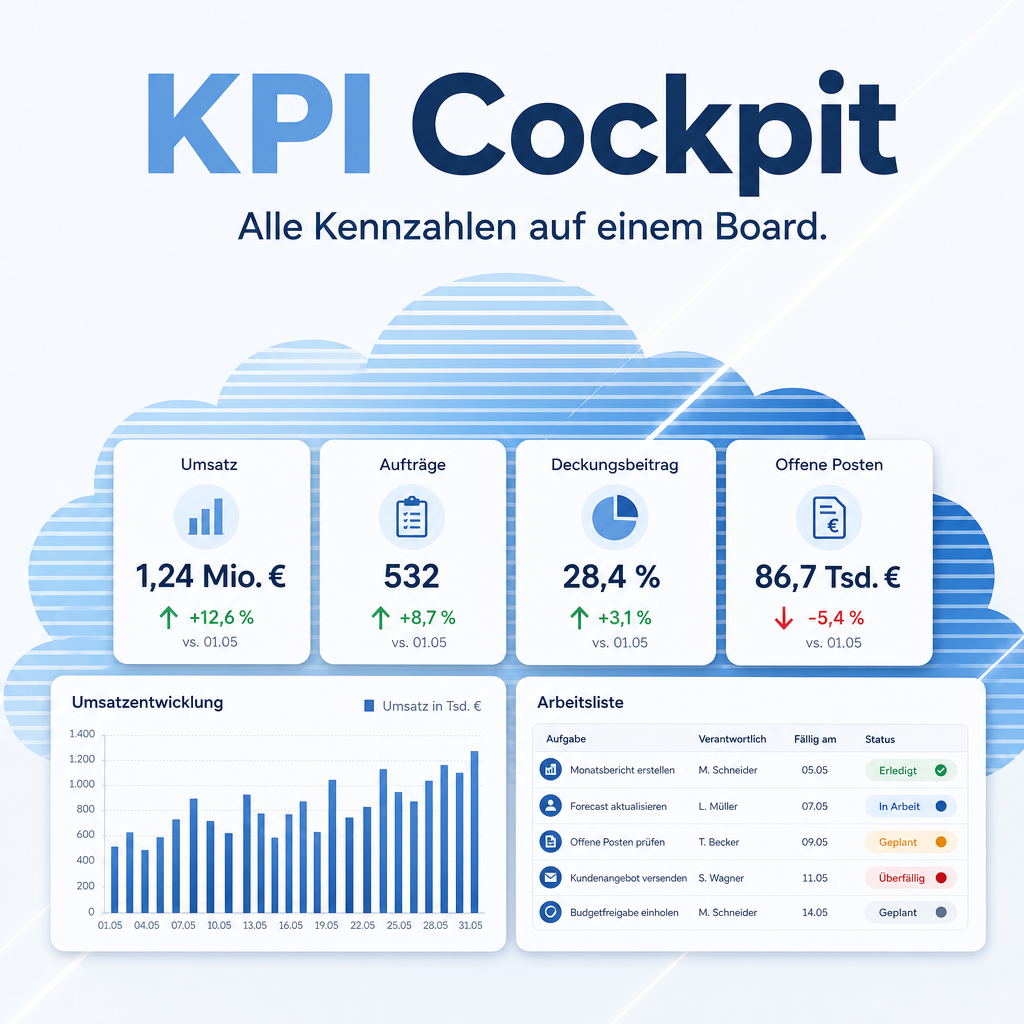
The KPI Cockpit shows key-figure tiles, charts, rankings and worklists on boards. Each tile compares itself with the previous period and turns green or red, and a click on any figure opens the records behind it. Everything is read live under each user's own access rights — no external service, no stored credentials.
The help for this module is findable — for people and for AI
Six help pages ship with the module, in German and English. Full-text search finds them from inside Odoo.
|
People search
who sees a board
Access and visibility
Visible to on a board lists groups. A user sees the board if they are in at least one of them.
Managing boards
Groups that may see the board. Empty means every cockpit user.
|
AI asks
eq.helper.doc.get_capability_card(
"eq_kpi_cockpit") The module card lists models, fields, methods, access rights and recipes. An assistant learns how boards and widgets are built before it answers.
“How do I limit a board to the sales team?”
|
Full-text search and the module card are provided by the module Help Docs (eq_helper). This module ships the content — no extra configuration.
Features
Tiles, charts and worklists on one board
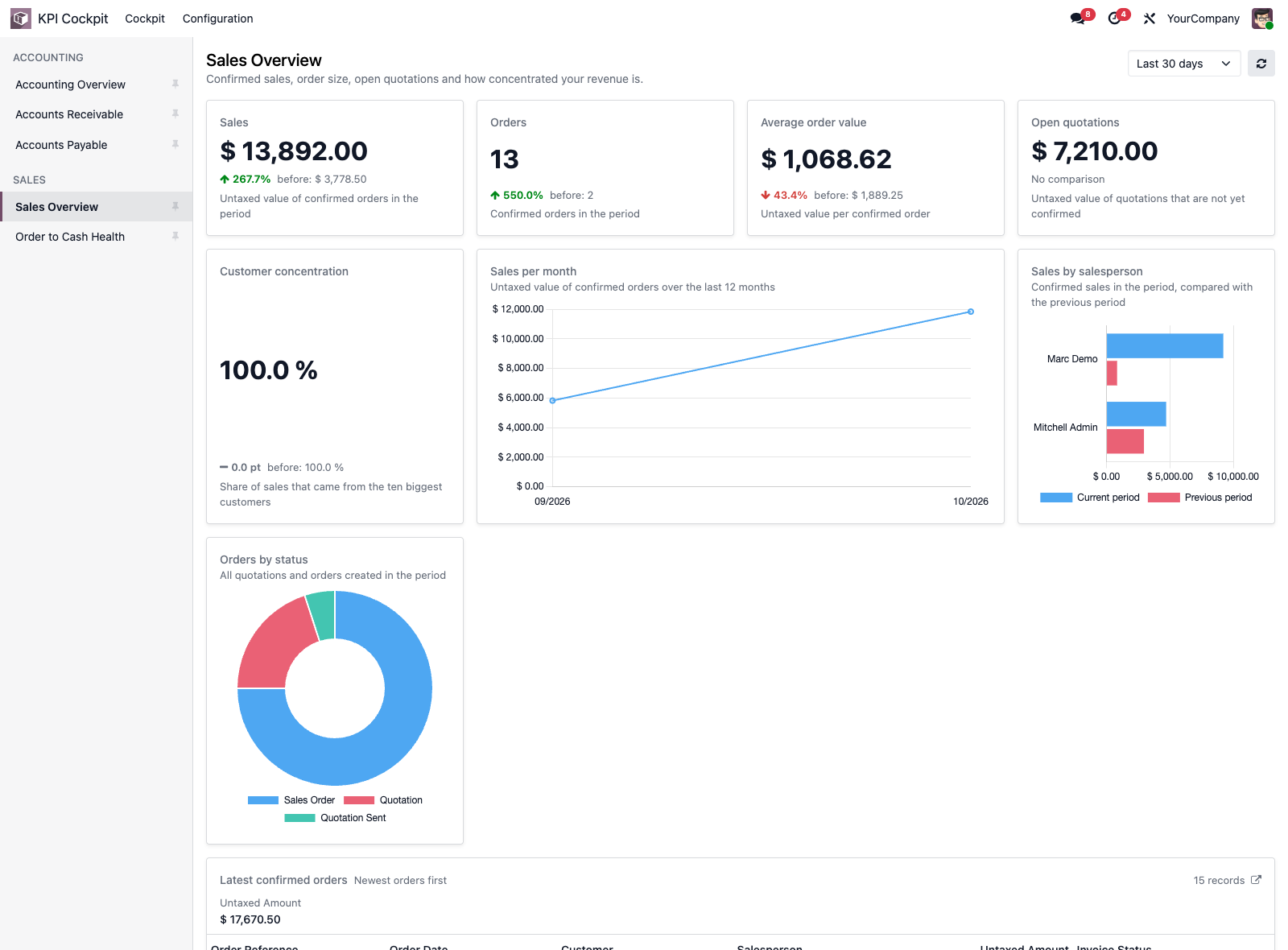
A board answers one question for one team. Key-figure tiles show the value, the change and the comparison value; charts come as bar, horizontal bar, line, pie or doughnut; worklists list the records you have to act on.
- Change against the previous period or the same period last year, green when it goes the right way, red when not
- Amounts, counts, percentages, days and plain numbers, formatted correctly
- Boards grouped by area: Accounting, Sales, CRM, Purchase, Inventory, Employees
Numbers you can check
A figure without its source is an opinion. Every tile, every chart bar and every worklist row leads to the records it was computed from, filtered exactly like the figure.
- Click a tile: the list of records behind the value
- Click a chart bar or slice: only the records of that bar
- Click a worklist row: the record itself; the header opens the full list
Change boards without code
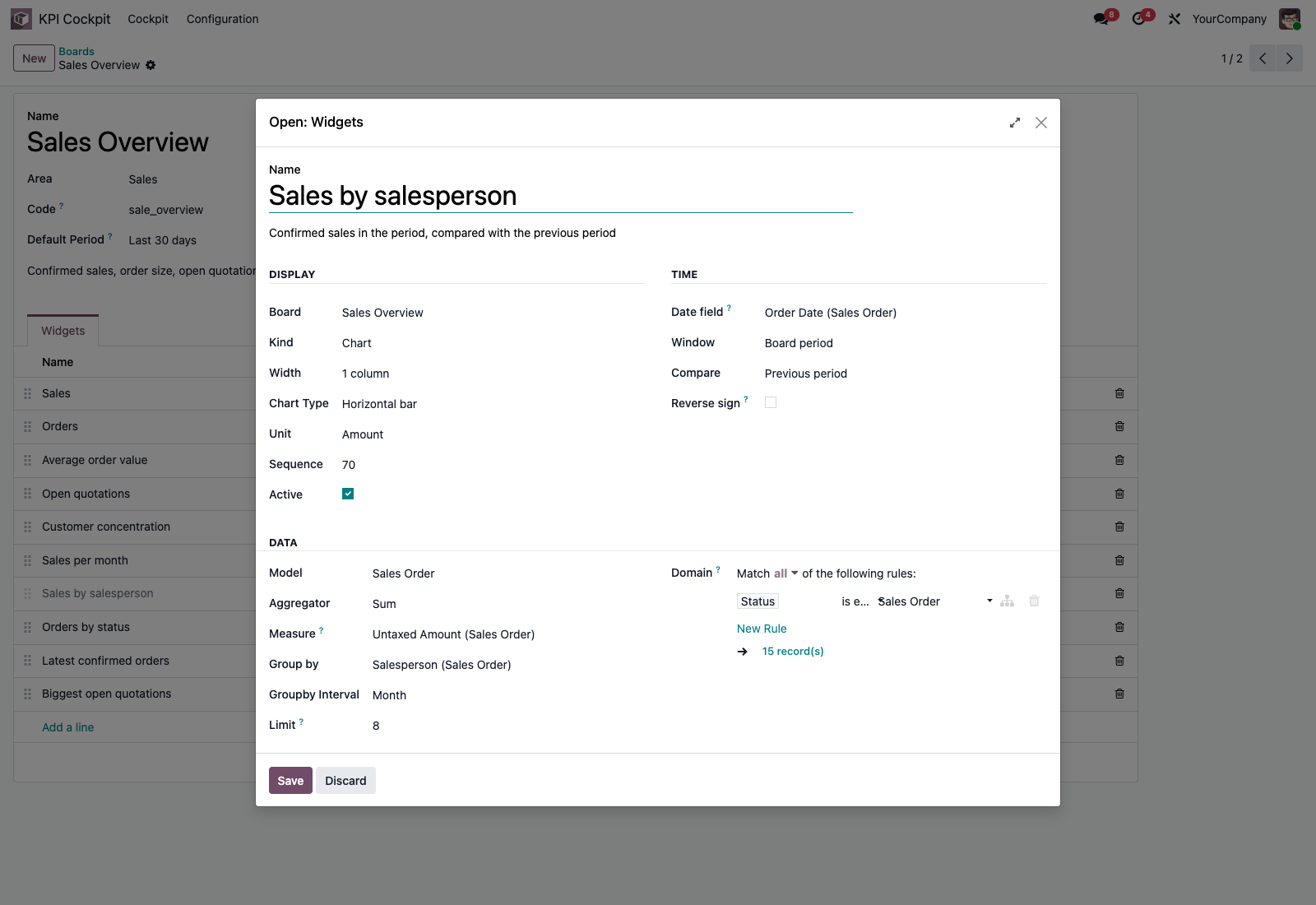
Boards and widgets are ordinary records. Pick the model, set the filter with Odoo's domain editor, choose the measure, the grouping and the time window — in a form. Copy a shipped board as the template for a variant.
- Sum, average, minimum, maximum or count of any number field
- Group by any stored field; dates by day, week, month, quarter or year
- Archive a board instead of deleting it
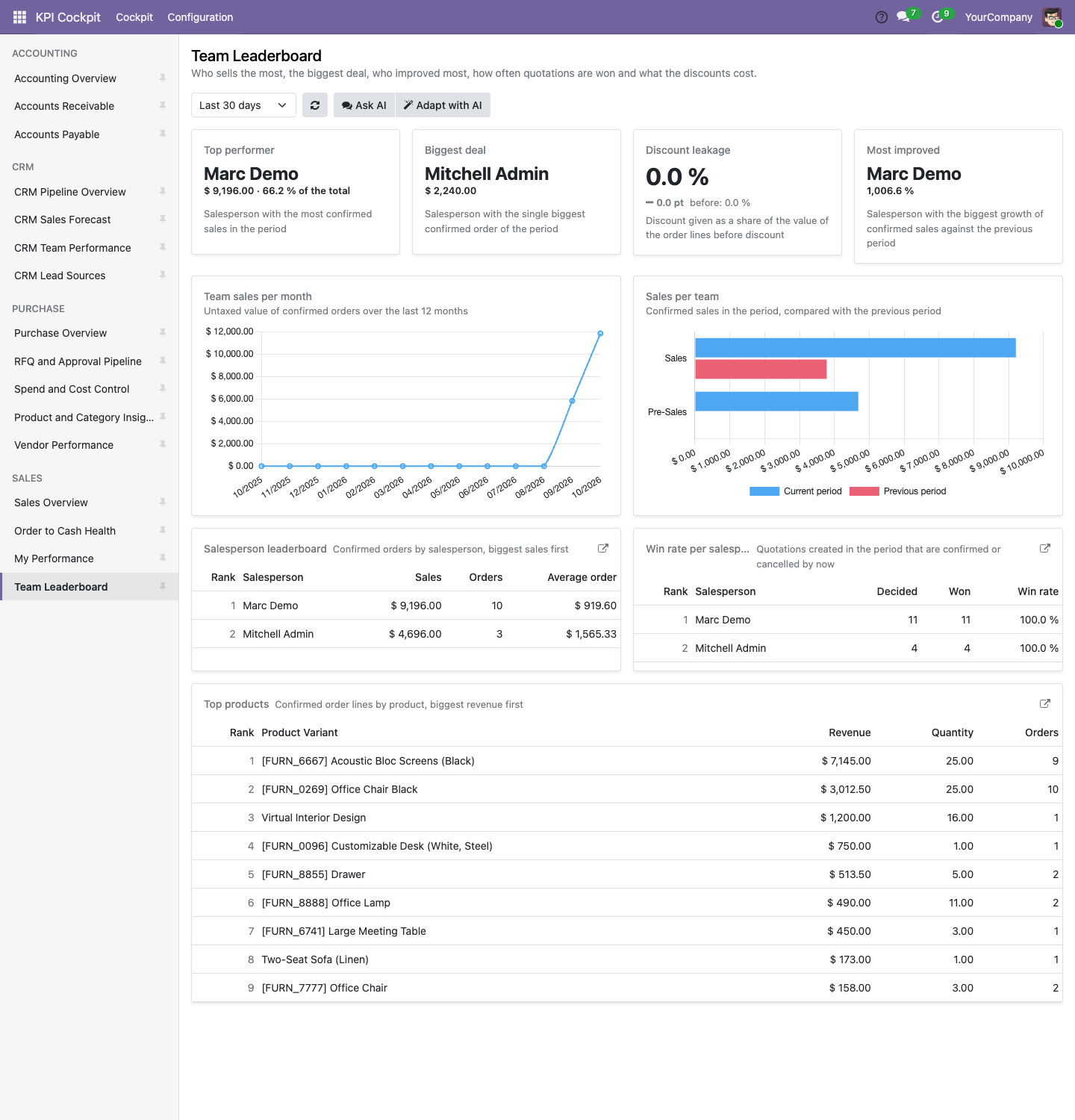
Rankings, leaders and shares
A ranking lists one row per group (salesperson, customer, vendor) with several columns, each with its own filter and, if you like, its own date field; the first column sorts. A key-figure tile can name the leading group instead of a number, and a share shows, for example, the win rate among decided opportunities.
- Column types: sum, average, minimum, maximum, count, count of distinct values and the ratio of two columns
- A click on a row opens the records of that group
- Charts grouped by a date show every interval of the period, including empty ones
Every figure under the user's own rights
The cockpit computes each figure as the signed-in user. Access rights, record rules and the selected companies apply, so a salesperson who sees only their own orders gets figures over their own orders. Nothing leaves your Odoo.
- No external service and no stored credentials
- A widget whose model or fields the user may not read is hidden, not shown with an error
- Amounts in the company currency, with a hint when several currencies are summed
One period for the whole board
The period selector at the top right switches every widget that follows the board period. Widgets for open items or for the last twelve months keep their own window.
- Last 30 days, this month, last month, this quarter, this year, last 12 months
- A custom date range with From and To
- To-date periods meet the same number of days of the period before
- Own windows per widget: Today (against yesterday), This week (week start follows the user’s language, against the same weekdays of the week before) and Next 7 days for what is due
- Optional link to a further report on a card, for example an Enterprise accounting report; it shows only if that report exists in the database and the user may open it
The right boards for the right people
Restrict a board to groups, so accounting sees accounting and sales sees sales. Everyone pins the boards they use every day; the last board opened comes back on the next visit.
- Visibility per board by group; empty means every cockpit user
- Personal pins, shown on top of the board list
- Boards for accounting, sales, CRM and purchase included through four bridge modules
A monthly report in the managers’ mailbox
On the first workday of the month, from 06:00 in the recipient’s time, the report arrives by mail: the key figures and the top five of every ranking in the mail body, the complete board as a PDF attachment. Each report is computed with the recipient’s own rights, so nobody receives a figure they could not open in the cockpit.
- Previous month against the month before, as in the cockpit
- Managers subscribe other users; everyone can switch the report on or off for themselves with “Monthly by mail”
- Menu “Monthly reports” lists all subscriptions; the same board is available as PDF with the button “As PDF”
Arrange your own boards
Managers rearrange a board in the cockpit itself: move widgets, set the width from one to four columns, add a new widget or copy one from another board, and remove one. Removing archives the widget; it comes back through the Archived filter in the widget list. “New board” creates an empty board with visibility by group.
- Drag pinned boards into your own order
- Switch granularity (day, week, month, quarter, year) and measure per widget without changing the saved board
- Worklists show every row in its own currency, sums per currency and the notice “Mixed currencies”
- A board has a stable link: /odoo/kpi-cockpit?board_id=
Frequently Asked Questions
Which Odoo editions are supported?
The module runs on Odoo Community and Odoo Enterprise, version 19.0 — self-hosted or on Odoo.sh. Odoo Online, the hosted SaaS edition, does not accept apps from the store, so no third-party module can run there.
Do I need to program anything?
No. Boards and widgets are records in normal Odoo forms. The accounting, sales, CRM and purchase boards come ready-made with the bridge modules.
What are the dependencies?
The Odoo modules web and mail, which Odoo installs automatically. The module needs no Python package.
Do the figures leave my Odoo?
No. All figures are computed inside your Odoo database when a board is opened. The module uses no external service and stores no credentials.
Who sees which board?
Users with the group "KPI Cockpit / User" open the cockpit and see the boards their groups allow; administrators with "KPI Cockpit / Administrator" edit boards and see all of them. The figures always follow the user's own access rights. The administrator accounts of the installation hold the Administrator group from the start; other users receive the User group in the user form.
Where do the accounting, sales, CRM and purchase boards come from?
From the bridge modules, one per application: Accounting (eq_kpi_cockpit_account), Sales, CRM, Purchase, Inventory and Employees, plus Time Off, Attendances, Recruitment and Expenses on top of the HR overview – 35 boards in total, 33 of them on Community. They install themselves as soon as the matching application is installed next to the cockpit (eq_kpi_cockpit_; eq_kpi_cockpit_purchase_stock adds receipt-based figures to the purchase boards when Purchase and Inventory are both present). Two bridges, eq_kpi_cockpit_hr_payroll and eq_kpi_cockpit_quality, need the Odoo Enterprise apps Payroll and Quality and cannot be installed on Community.
Do my changes to a shipped board survive an update?
Yes. Boards from the bridge modules are loaded once and are not overwritten by a module update.
What is the technical name?
eq_kpi_cockpit.
Will it work after an Odoo update within the same major version?
Yes, within 19.0.x. Major version upgrades are delivered as a new module version.
Do you provide support?
Yes. Contact support@equitania.de or the support portal https://support.equitania.de.
Support · Kontakt
We are happy to support you · Wir unterstützen Sie gerne.


Weiherstraße 13
75173 Pforzheim
Deutschland · Germany
Telefon: +49 7231 16 604 0
Telefax: +49 7231 16 604 200
Homepage: www.ownerp.com
Support: support.equitania.de
E-Mail: support@equitania.de
EN · All information on this page is provided for product description purposes only and is not legally binding. It constitutes neither a guarantee of quality nor an assurance of any particular scope of functions, fitness for a particular purpose or specific results; only the contractual agreements and the scope of delivery of the version actually installed are authoritative. Screenshots show example configurations. This description was written with AI assistance and was reviewed and approved before publication; the German version prevails.