Mail Center
All your Odoo email in one place — read, write, and trace every message without leaving the system.
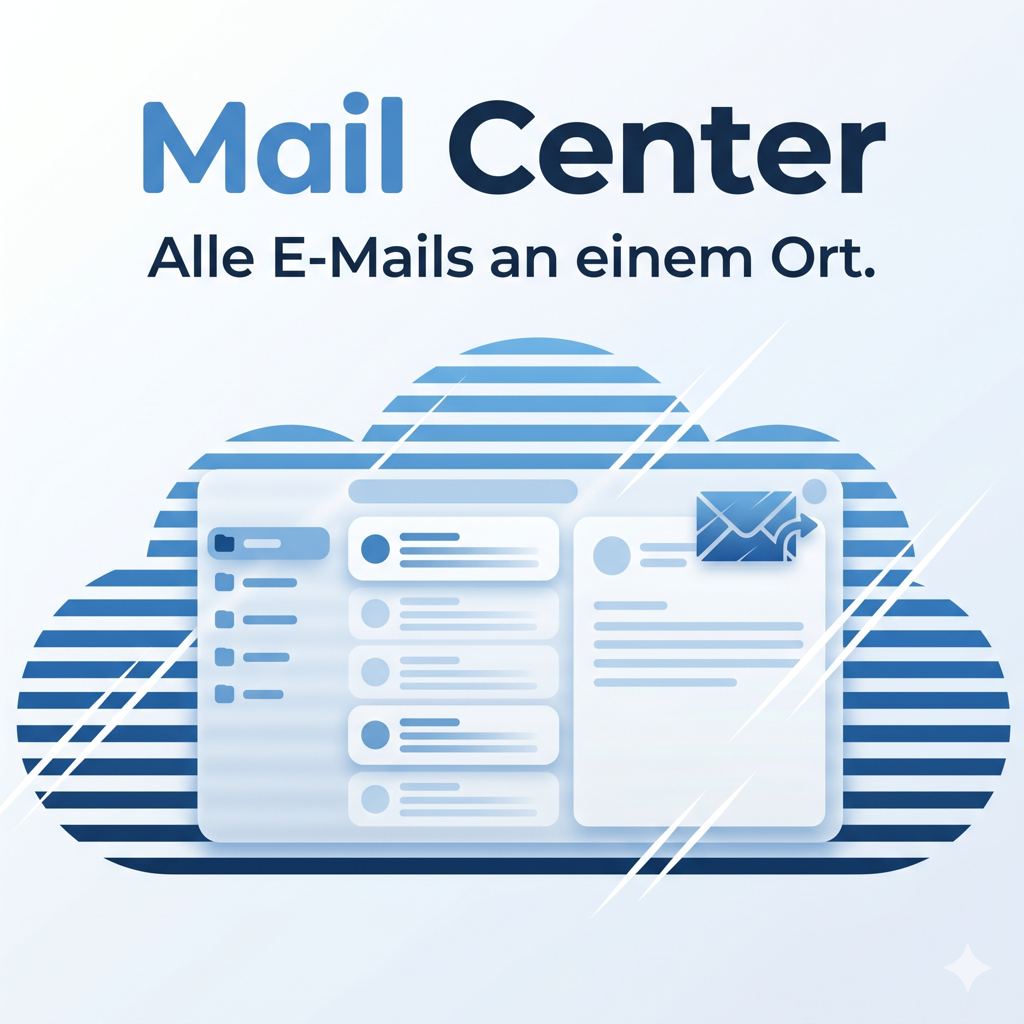
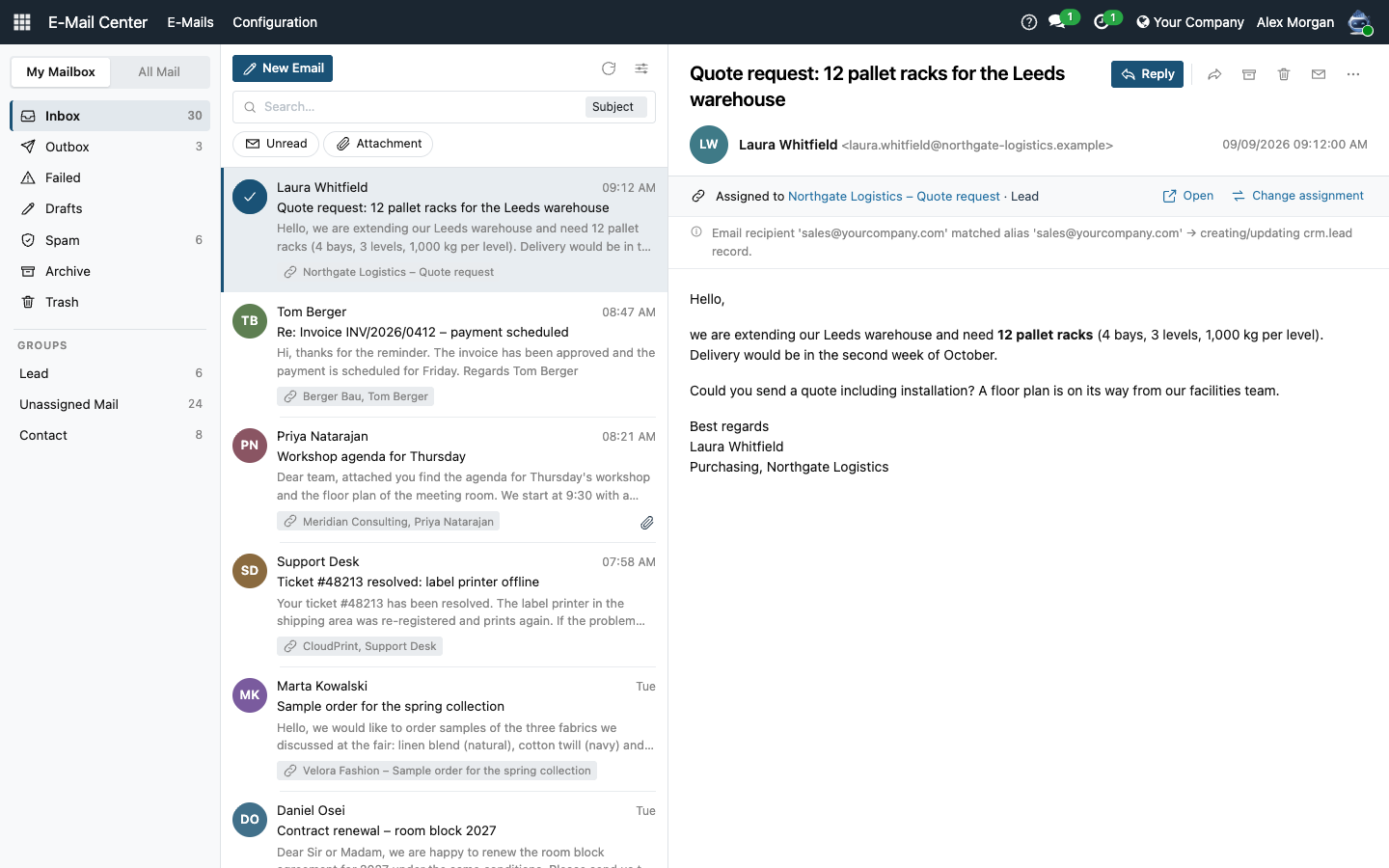
Mail Center gives Odoo a familiar three-pane mail client — folders on the left, message list in the middle, reader on the right — right inside the backend. Read incoming emails with full HTML formatting, reply and forward with the rich-text editor, attach files, and see instantly which record each message is linked to. A transparent routing log explains every assignment decision, so no email disappears into a black box. Delivery status badges (Sent / Queued / Failed) plus a one-click retry keep outgoing mail under control. A blocklist keeps unwanted senders out of the inbox entirely — their mail is intercepted before it reaches a record and is kept in a Spam folder.
On a smartphone the client switches to a stacked navigation like a native mail app, your layout and preferences follow you onto every device, and thanks to per-user mail accounts and an optional direct Reply-To mode it can even run entirely without a central catchall mailbox.
The help for this module is findable — for people and for AI
Four help pages in German and English, shipped inside the module. With Help Docs installed you search them in full text — and an AI assistant reads the same content through a machine-readable module card.
"eq_mail_center")
Full-text search and module card come from Help Docs (eq_helper). This module ships the content — no extra configuration.
Features
Outlook-style three-pane mail client
A dedicated Mail Center app provides folders (Inbox, Outbox, Failed, Drafts, Archive, Trash), a message list, and a reader pane — all in the Odoo backend. Column widths are draggable and remembered per user.
- Inbox, Outbox, Failed, Archive, Trash and system-wide views in one app
- Resizable sidebar and list pane — widths follow the user onto every device
- Outlook-style list rows: bold subject + time on one line, body preview below (2 or 3 lines, configurable)
Write, reply and forward — with drafts, Cc/Bcc and a movable window
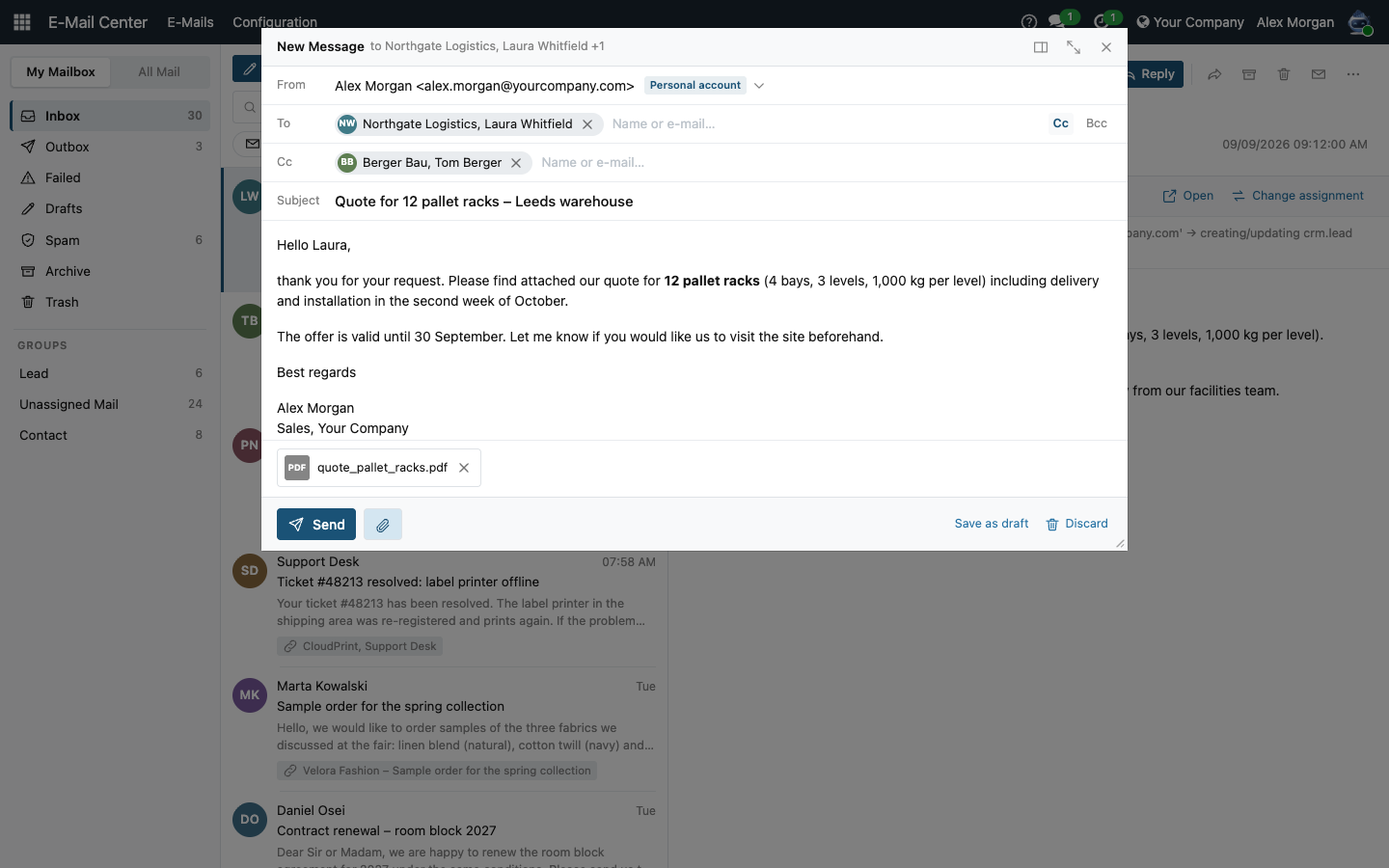
The composer opens either docked below the reading pane or as its own window, and you switch between the two at any time — the written text, the recipients and the attachments all come along. The window can be dragged by its title bar, resized by the corner grip, and a double-click fills the screen; the size is remembered per user.
- Send, attach and discard sit in a fixed footer instead of drifting with the message length
- From row shows which account the mail leaves through — system server or your personal mail account
- Cc and Bcc switchable per message; a blind copy goes out as a separate mail, so recipients never see each other
- Save as draft parks the message in the Drafts folder; one click reopens it exactly where you left it
- Recipients stored as contacts appear as chips with initials, a free-typed address stays dashed
- Full HTML editor with your Odoo signature pre-filled
Block a sender — and never see their mail again
Addresses and whole domains you no longer want to hear from go onto a blocklist. Mail from there is intercepted while it is fetched, before Odoo assigns it to a customer or an order: no chatter entry on the record, nobody notified, nothing in the inbox. It is kept in a Spam folder rather than discarded, so a sender blocked by mistake can be released again.
- Block a single address or a whole domain — for senders who keep switching mailboxes
- Both ask first and name how many existing messages would move along
- Every entry records how often and when it last matched, so a rule catching too much becomes visible
- Selected messages can be moved to Spam and back without touching the blocklist
- A daily job clears spam after a configurable retention (30 days by default; 0 keeps everything)
- Blocking is reserved for Mail Center Managers — the list applies to the whole database
Transparent routing log — no more black box
Every incoming email generates a routing log entry that records which phase matched (alias, reply thread, or fallback) and why. Mail Center Managers can review the full log under Configuration > Routing Log.
- Routing decision visible directly in the reader pane
- Full audit log accessible to the Manager group
- Email assignment shown with an "Open" button linking to the document
- Reassignment dialog: move any email to a different record in two clicks
Delivery status and one-click retry
Colored status badges (Sent / Queued / Failed / Cancelled) appear in the message list and the reader. A "Retry" button in the reader re-queues a failed email without leaving the mail client.
- Status visible in list and reader — no need to dig into technical logs
- One-click retry directly from the reader pane
- Outbox and Failed folders consolidate all pending/broken sends
Flexible search and email statistics per record
Search across all emails by subject, sender, recipient, or message body. A configurable scope selector (remembered per user) keeps results focused. Any chatter-enabled model gains incoming/outgoing email counts and last-contact date fields.
- Search scope: subject, sender, recipient, content, or all
- Quick filters: unread only, with attachment
- Personal mailbox view and system-wide view (Manager group)
- Email statistics fields on every mail.thread model (partner, lead, order, …)
- Dates displayed in the user's locale and timezone
Keep the mailbox tidy: Archive, Trash and bulk actions
Finished conversations move to a shared Archive, deleted messages land in a Trash folder and can be restored at any time — permanent deletion stays reserved for managers. Checkboxes and a bulk toolbar handle dozens of messages in one step, and new mail appears automatically without reloading the view.
- Archive and Trash with restore; permanent deletion is manager-only
- Bulk actions: archive, delete, restore, mark read/unread, reassign — plus "mark folder read"
- Keyboard navigation: arrow keys, Delete, U (unread), R (reply)
- Incoming mail refreshes the view automatically — the open message stays put
Run without a catchall mailbox — personal mail accounts per user
An optional Reply-To mode sends replies straight back to the author's own address instead of a central catchall mailbox — replies are still matched to the right record. Every user can store their own sending and receiving mailbox ("My Mail Account") without admin rights.
- Optional Reply-To mode: replies go to the sender's own address, record assignment preserved
- Personal SMTP/IMAP accounts, set up by the users themselves; passwords are never shown again
- Outgoing mail always uses the authenticated sender address — avoids spam classification
- Guided setup check with one-click fixes: sender addresses, Reply-To mode, personal accounts
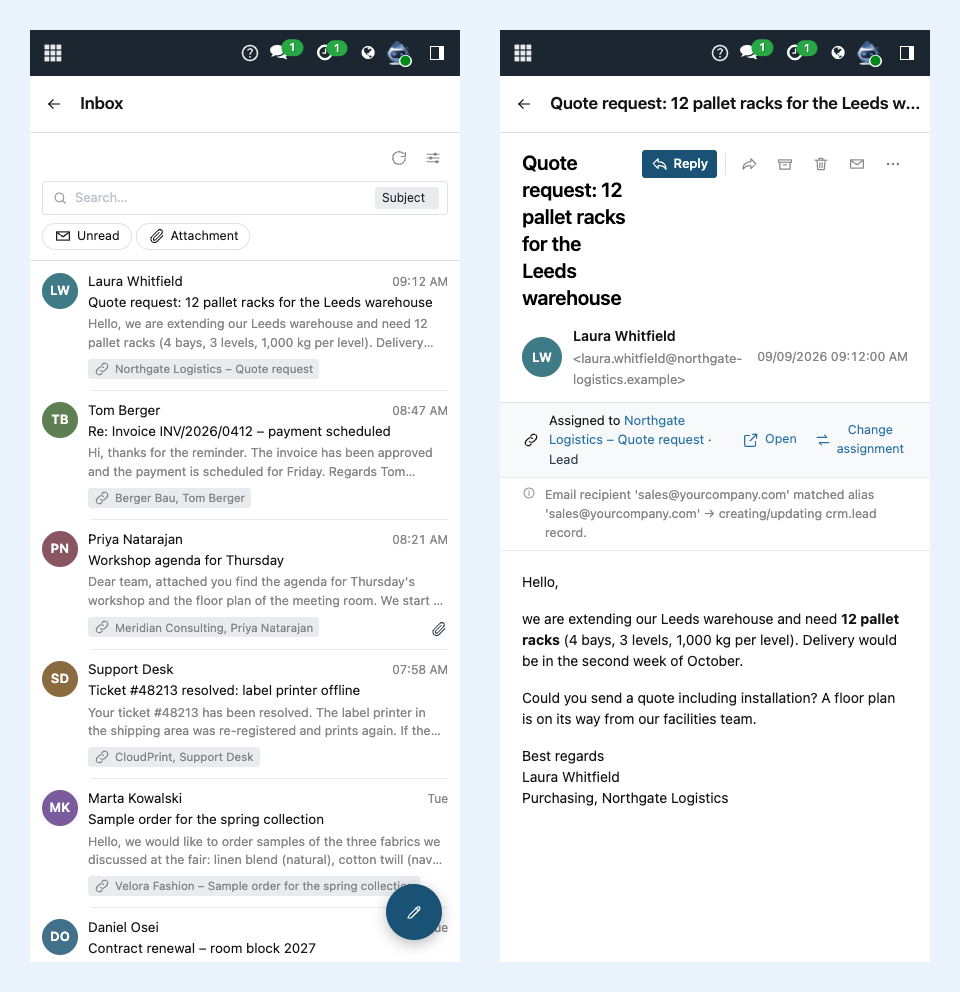
Works on your phone — and remembers your layout
On a smartphone the client switches to a stacked navigation like a native mail app: folders, then the message list, then the reader — each with a back arrow; composing opens fullscreen. All layout preferences are stored per user on the server, so they apply in every browser and on every device.
- Smartphone-ready stacked navigation — Community and Enterprise alike, no extra modules
- Pane widths, composer mode, preview lines and search scope saved per user across devices
- Compose popup freely resizable via a corner grip; the size is remembered
- Record assignment always shows the friendly model name ("Contact"), never technical identifiers
Frequently Asked Questions
General
Does Mail Center replace my email client (Outlook, Thunderbird)?
Not entirely — it is optimized for emails that flow through Odoo (inbound via aliases, outbound via the chatter or mail client). You can read, write, reply and forward directly in Odoo. Emails that are sent purely externally and never touch Odoo will not appear here.
Does the routing logic work with existing mail aliases and catch-all addresses?
Yes. Mail Center hooks into Odoo's standard mail.thread.message_route() mechanism and logs every decision made by that mechanism — it does not replace it. Your existing aliases and catch-all rules continue to work exactly as before; you simply gain a transparent log of each routing outcome.
Does Mail Center work on smartphones?
Yes. Below the tablet width the client switches to a stacked navigation like a native mail app (folders → list → reader, with back arrows), and the compose window opens fullscreen. This works in Community and Enterprise and requires no additional module.
Can I run Odoo without a central catchall mailbox?
Yes. Enable the optional Reply-To mode "Sender's own address" and replies go straight back to the message author — while still being matched to the correct record. Combined with personal per-user mail accounts, no central catchall mailbox is required; the built-in setup check guides you through both modes.
Installation & Compatibility
Which Odoo editions and versions are supported?
Mail Center runs on Odoo 19.0 Community and Enterprise — self-hosted or on Odoo.sh. Odoo Online, the hosted SaaS edition, does not accept apps from the store, so no third-party module can run there. There is no dependency on any Enterprise-only feature.
What modules does it depend on?
Only mail and base_setup — both are standard Odoo modules that are installed in every Odoo 19 instance. No third-party dependencies.
How do I install the module?
Copy eq_mail_center to your Odoo addons directory, activate developer mode, update the app list, search for "Mail Center" and click Install. The Mail Center app then appears in the main menu.
License & Support
What license does Mail Center use?
Mail Center is released under the Odoo Proprietary License v1.0 (OPL-1). This is a commercial license; the purchase is completed in the Odoo App Store.
Where do I get support?
Open a ticket at support.equitania.de or email support@equitania.de.
Will the module continue to work after patch releases within Odoo 19?
Yes. Within Odoo 19.x we ship compatible updates. A new major version (e.g. Odoo 20) would require a new module version, which we plan to provide.
Support · Kontakt
We are happy to support you · Wir unterstützen Sie gerne.

Weiherstraße 13
75173 Pforzheim
Deutschland · Germany
Telefon: +49 7231 16 604 0
Telefax: +49 7231 16 604 200
Homepage: www.equitania.de · www.ownerp.com
Support: support.equitania.de
E-Mail: support@equitania.de
EN · All information on this page is provided for product description purposes only and is not legally binding. It constitutes neither a guarantee of quality nor an assurance of any particular scope of functions, fitness for a particular purpose or specific results; only the contractual agreements and the scope of delivery of the version actually installed are authoritative. Screenshots show example configurations. Product and company names mentioned are trademarks or registered trademarks of their respective owners; naming them implies neither affiliation with nor endorsement by those owners. This description was written with AI assistance and was reviewed and approved before publication; the German version prevails.